Social and Legal implications of using mobile technologies.
Legal Implications -
Phone Driving -
If you are on the phone either having a phone call or texting someone or even on social network you are breaking the law. Whilst you are on your phone you loose all your concentration on the road and you forget what you doing as you are not paying attention. Not paying attention to the road can cause accidents -
For example if you looking down on your phone and not on the road you could end up in the back of the car in front of you.
To stop causing accidents and to stop breaking the law you could either turn your phone off or keep it somewhere you can see it so it don't cause temptation staring at it.
Phone Theft -
Phone theft is also against the law. If you put your phone in your back pocket or somewhere where it is visible to see you are in the risk of getting your phone stolen.
To prevent your phone being stolen you have to put it somewhere safe - for example in a zipped pocket, bag etc where no one knows where it is expect from you.
Piggybacking -
Piggybacking is when you use someones wireless network. This is against the law because you using it for free and without their permission on using the wireless network.
Social Implications -
Cyber bulling -
Cyber bulling is when you bully someone by calling them names or threatening them over social network. This is why we use 'cyber' because it is online.
To stop this we can either block the people who are bulling or dont add them as a friend or even report them.
Thursday, 9 May 2013

Thursday, 25 April 2013
P4 & M2 UNIT 14
P4-
The technology that can be used to send pictures are
FACEBOOK-
With Facebook you can upload photos and onto your own albums. However if you don't want people to see your photos you can change your privacy settings to 'only friends'. If you don't do this the whole Facebook can see your photos even if you don't have them as a friend. There is 5 settings - 'Friends' 'Friends of friends' 'Only me' and 'Custom' which allows you to hide your photos from certain people.
INSTAGRAM-
Instagram is also a site you can use for uploading photos. However Instagram has its disadvantages which included you have to crop your photo so its a certain size which could cause some problems Also you cant save photos on Instagram the only way you could do it is screenshot it depending how what type device you have. However Twitter does not crop photos but Twitter AND Instagram are very public.
EMAIL-
Email is one of the most popular ways you could use to send photos to people. Its a good idea to send photos to people if your on holiday and you would like to show them where you are and what is your surroundings. The disadvantages are you can only send a limited amount of photos so if you would like to send alot you would have to do it in a number of emails. However its a quick easy way if you only have a couple of photos.
TWITTER-
Twitter is a difficult way to send photos because the only way you could do it is by uploading it to your profile. This is bad because everyone following you on twitter can see the photo you just uploading. It depends how who you want to show and what the photo is. However comparing Facebook to it is that Facebook and Instagram is alot more private than twitter.
PICTURE MESSAGES-
Picture message is also quite difficult because it cost to send a photo even though your on contract but just say your on pay as you go it will cost alot more than 10/15p because your added an extra file. Also the picture quality is quite poor. However its a quick easy way to save it to your mobile. On the other hand other social networking like Facebook would be easier because you can send a picture through inbox.
Thursday, 18 April 2013



Thursday, 21 March 2013


Thursday, 21 February 2013
Unit 14 P1 & P2
- Student who needs a mobile phone with internet access.
- Self employed builder who is new to technology and has £600 to spend on a laptop for invoicing.
- Journalist who needs a electronic tablet when on location.
- A factory worker who wants to listen to an MP3 player on the bus.

Blackberry Bold 9790
- Optical track-pad.
- Marvell Tavour MG 11 1GHz processor with 768mb RAM.
- Up to 432 hours standby time.
- Up to 310 mins talk time.
- Messaging: SMS, MMS, Email, IM, BBM.
- WAP compatible.
- 32GB microSD memory card (not included).
- Built-in 5MP camera.
- Video capture and playback.
- Colour screen.
- Bluetooth.
- Vibration alert.
- MP3 player.
- Size of handset H110, W60, D11.4mm.
- Weight 107g.
 iPad Mini Wi-Fi 16GB
Display:
- 7.9in.
- LED backlit display.
- Multi-touch screen.
Product specifications:
- 16GB.
- B/g/n wireless/WiFi enabled.
- Bluetooth.
- 3.5mm stereo headphone.
- Built-in speaker.
- Microphone.
- 5MP iSight camera with 1080p HD video recording.
- iOS 6 and iCloud.
- Mobile data service on Wi-Fi and Cellular models (data plan sold separately).
General features:
- Up to 10 hours battery life (depending on usage).
- 0.72cm thin.
 iPod Shuffle 8GB
- Small and wearable with a polished anodised alumiunium finish.
- Play your music, audiobook or podcast.
- The VoiceOver button enables you to hear the song title, playlist menu and battery status.
- Supports multiple playslists and Genius Mixes.
- Clip, volume controls.
- 2GB storage.
- Compatible with MAC and PC.
- Recharge through USB port.
- 15 hours battery life or provides up to 15 hours music playback.
- Includes earphones.
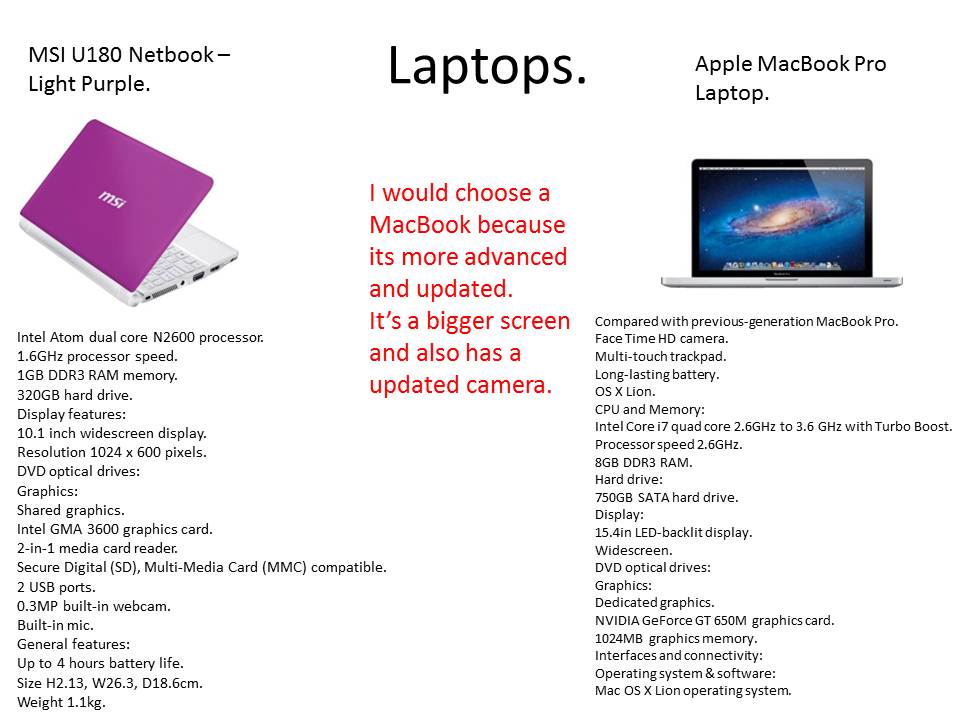
 MSI Laptop Purple
Display features:
- 10.1in widescreen display.
- Resolution 1024 x 600 pixels.
Graphics:
- Shared graphics.
- Intel GMA Intel GMA 3600 graphics card.
- Graphics card memory 256MB.
Interfaces and connectivity:
- 2-in-1 media card reader.
- Secure Digital (SD), Multi-Media Card (MMC) compatible.
- 2 USB ports.
- 1 Ethernet port.
- 1 HDMI port.
Multi-media features:
- 0.3MP built-in webcam.
- Built-in mic.
Operating system and software:
- Microsoft Windows 7 Starter.
- Anti-virus and security (trial).
- Adobe Reader.
General features:
- Up to 4 hours battery life.
- Size H2.13, W26.3, D18.6cm.
- Weight 1.1kg.
Thursday, 7 February 2013

d1
D1
You can make your information and data safe by
using privacy settings.
You can find your privacy settings on your settings on most internet sides for example Facebook Twitter etc.
If you change your settings to only 'friends' then only the friends you have can only see what you post for example your pictures and status updates.
But if you change your settings to 'everyone' then anyone can see your what your doing.

Also you will need to make a secure password. Don't make one obvious for example your name 'alexure123' because anyone could guess that.
Make sure you log out when you have finished on your social network site and clear all your history so people cant hack they way into your account.
You can make your information and data safe by
using privacy settings.
You can find your privacy settings on your settings on most internet sides for example Facebook Twitter etc.
If you change your settings to only 'friends' then only the friends you have can only see what you post for example your pictures and status updates.
But if you change your settings to 'everyone' then anyone can see your what your doing.
Also you will need to make a secure password. Don't make one obvious for example your name 'alexure123' because anyone could guess that.
Make sure you log out when you have finished on your social network site and clear all your history so people cant hack they way into your account.
Subscribe to:
Posts (Atom)